Did You Know?


Is it possible to extend the expiry date on a current members package. Sometimes members might win a month membership for example, but already have a subscription
Transfer options are currently unavailable due to the complexity of the account audit. The only solution at this time is to refund the transaction and rebook the student into the correct course.

Hi support this is test query 3
In the class and membership settings, you can choose whether to display an option in the customer view by selecting either “YES” or “NO”.
The flow is already established and will remain unchanged. We recommend visiting the help center for a clearer understanding. The current view represents a minimum price view, and not all views can be displayed on the screen. By default, the selected price is already chosen on the next page during the booking process.
The scanner can be set to press Enter after each code scan, and you can find instructions in the scanner manual. For now, after scanning, press ENTER or click the search icon to view the complete customer details and membership package.
Option 1 – In Service Setup, In PAYG section you can create all services like Gym or anything except classes and PT then follow the same steps as suggested for classes. In this billing will be done from Book Now Section always by selecting suitable time from calendar.
Option 2 – In Settings You can create category with type of SERVICE, Then create New Product and select the same CATEGORY then select STOCK REQUIRED option as NO. After that it will List down in POS screen then you can bill it.
Note : If you have already created Item with STOCK REQUIRED as YES it can not be edit to STOCK REQUIRED as NO so you can delete those old items and create New one.
Stock Required option is allowed to set only when adding product not in edit. In your case you can delete products and create them again with Stock Required = No.
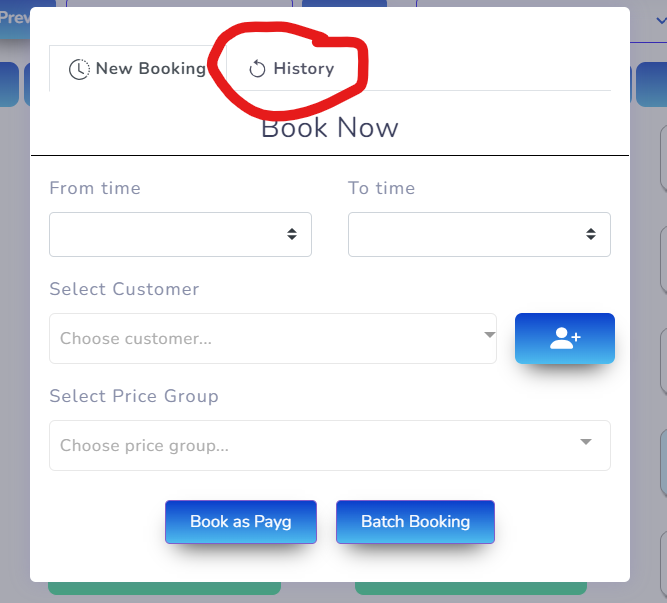
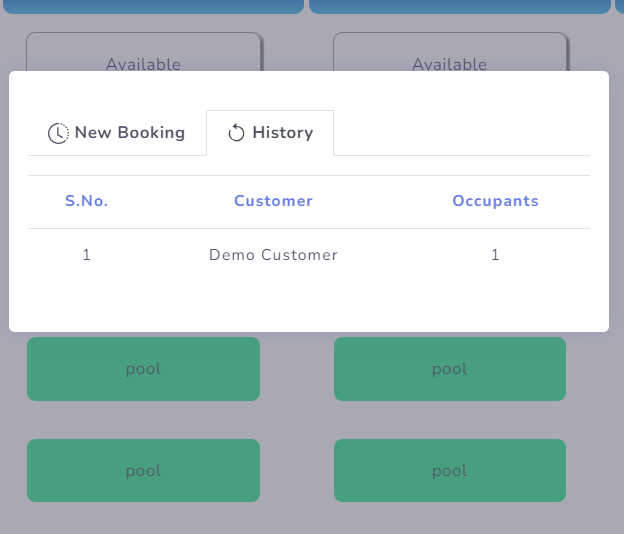
When you click on any available time or PAYG tile it opens a popup, in that popup there are two options 1. New Booking 2. History so when you click on history it shows you the list of persons with occupant booked for that time and date. check the screenshot for more information and clarity.
Certainly, we can disable any service not needed for customer web view and the mobile app. Providing a valid reason for such requests is given to avoid repetition.
For the Venue of the PAYG pool, more than 10 simultaneous bookings will appear in a single tile. If you choose batch booking in POOL and specify the number of lanes, it will allocate the specified number of lanes.
For the Venue of the PAYG pool, more than 10 simultaneous bookings will appear in a single tile. If you choose batch booking in POOL and specify the number of lanes, it will allocate the specified number of lanes.